
// SELLING
Payment details. Get paid in two taps.
Save your payment details once, and send them to a buyer straight from the conversation. No more digging out your account number for every sale.

How it works
-
Save your details
Add your bank account, or your own payment instructions, in settings.
-
Send them from the chat
When a buyer is ready, send your details as a tidy card in the conversation.
-
The buyer copies and pays
They copy the account number in one tap. No typos.
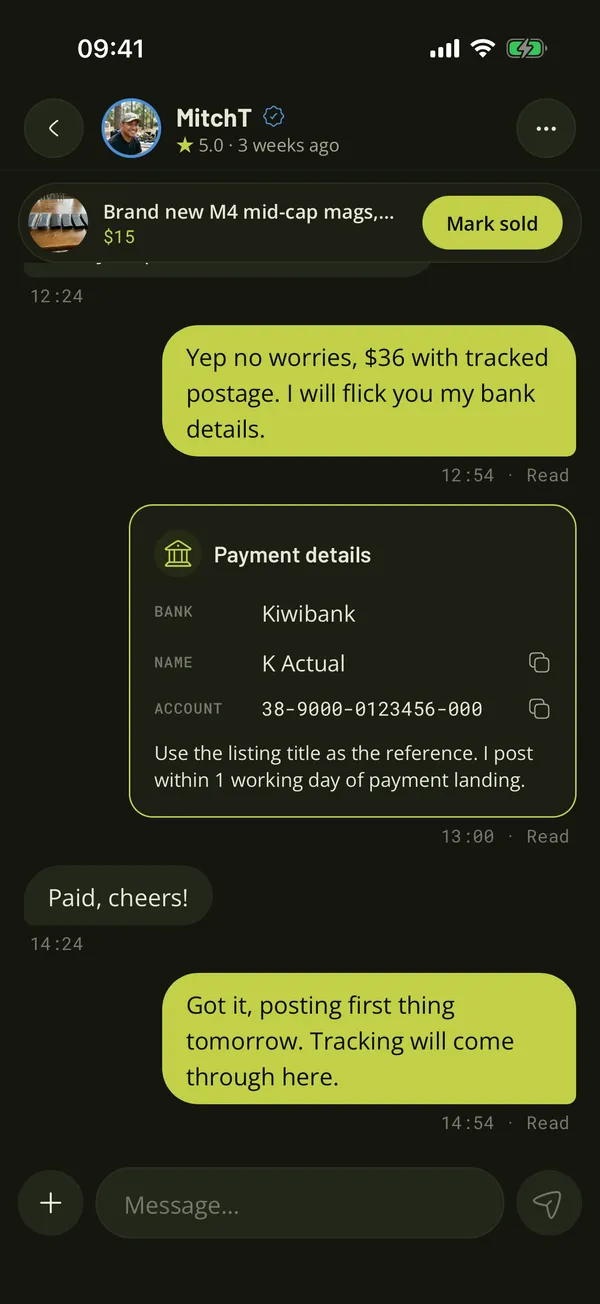
// IN THE CHAT
A tidy card, not a wall of numbers
Payment details arrive as a clear card with copy buttons, linked to the listing you're selling.
The card shows when your details were set and whether they've changed, so buyers can see they're dealing with the same person.
- Set once, use for every sale
- Bank transfer or your own instructions
- Buyers copy it in one tap
- Shows when details last changed
Frequently asked questions
How do I send my bank details to a buyer?
Save your payment details once in settings. Then, in any conversation about your listing, send them as a card in a couple of taps.
Do I have to use a bank account?
No. You can choose bank transfer, or write your own payment instructions instead.
Can buyers see my bank details on my profile?
No. Your details are only shared when you send them to a buyer in a conversation.
More on TradeSoft
// GET THE APP
Join TradeSoft. It's free.
Sell your gear and get paid without the hassle. Free on iPhone and Android, and on the web.


Prefer your browser? Use TradeSoft on the web