
// SELLING
Mark sold. Close the deal in seconds.
When the deal's done, mark it sold. It keeps your listings honest and your trading record growing.

How it works
-
Tap Mark Sold
From the listing, your chats or My listings.
-
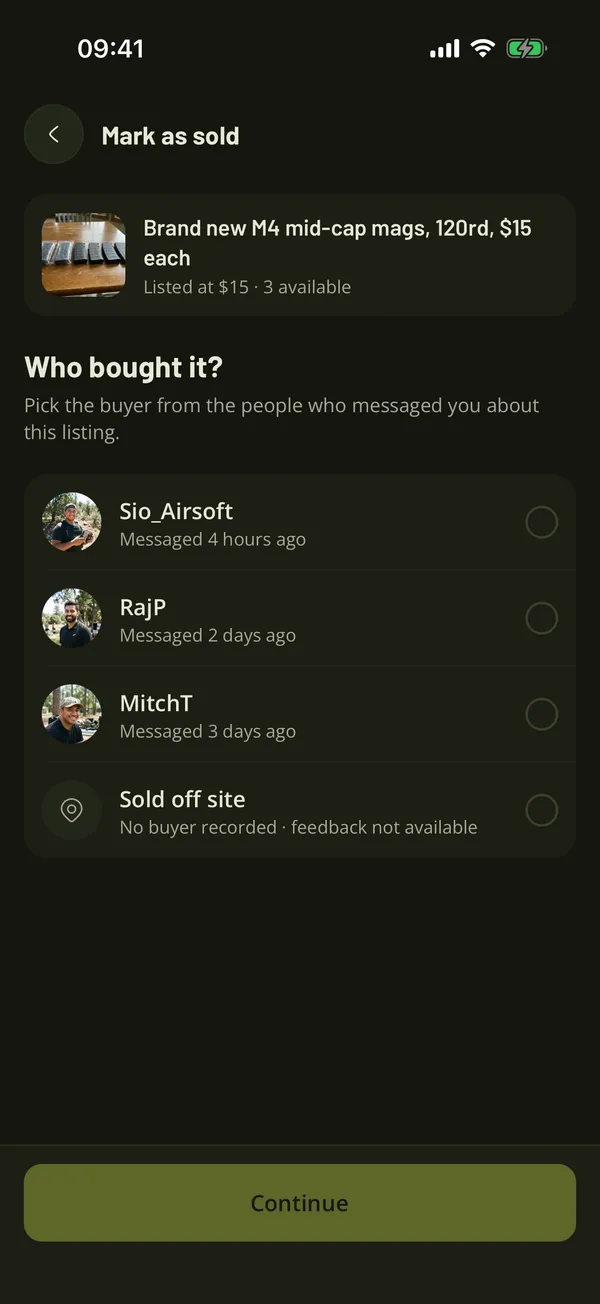
Pick the buyer
Choose from the people who messaged you about it, or record that it sold off TradeSoft.
-
Leave feedback
You and the buyer can rate each other once the sale is recorded.
// CLOSE THE LOOP
Honest listings, a growing record
Sold items come off the market, so buyers only see what's genuinely available.
Selling multiples? Record how many went to each buyer and the listing stays live for the rest.
- Pick the buyer from your chats
- Record sales made off TradeSoft
- Partial sales keep the listing live
- Both sides can leave feedback
Frequently asked questions
How do I mark a listing as sold?
Tap Mark Sold on your listing, choose the buyer from the people who messaged you, and confirm.
What if I sold it somewhere else?
Choose Sold off site. The listing comes off the market, though feedback isn't available for that sale.
Why should I mark items as sold?
It keeps the market accurate for buyers, records the purchase for your buyer, and lets you both leave feedback.
More on TradeSoft
// GET THE APP
Join TradeSoft. It's free.
Sell your gear on TradeSoft. Free on iPhone and Android, and on the web.


Prefer your browser? Use TradeSoft on the web