
// MESSAGING
Notifications. Hear what matters, mute the rest.
TradeSoft lets you choose exactly which alerts you get, and whether they arrive as a push or an email.

How it works
-
Open settings
Go to Notifications in your account.
-
Pick your alerts
Messages, questions, answers, price drops, wishlist matches, events and more.
-
Choose push or email
Switch each one on or off for push and email separately.
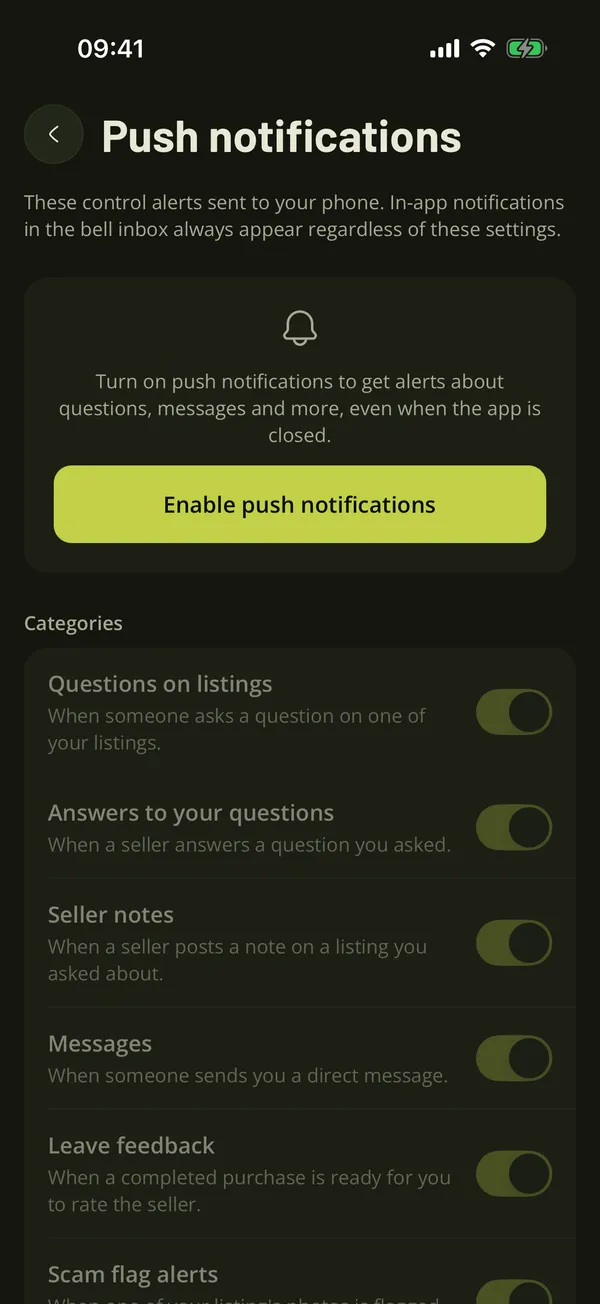
// ON YOUR TERMS
In control of every alert
Keep instant pushes for messages and turn off what you don't need.
Prefer a summary? Get a daily 8pm email roundup of wishlist matches.
- Each alert on or off
- Push and email settings
- Daily wishlist email roundup
- Change it any time
Frequently asked questions
Can I turn off some notifications but not others?
Yes. Each alert type can be switched on or off for push and for email.
Can I get wishlist matches by email?
Yes. You can get a daily 8pm email summary of new wishlist matches.
Will I still see alerts in the app if I turn off push?
Yes. In-app notifications in your bell inbox always appear, whatever your push settings.
More on TradeSoft
// GET THE APP
Join TradeSoft. It's free.
Stay in the loop, your way. Free on iPhone and Android, and on the web.

Prefer your browser? Use TradeSoft on the web