
// PRIVACY
Account controls. Your account, your call.
TradeSoft gives you control over what others see and what happens to your data.

How it works
-
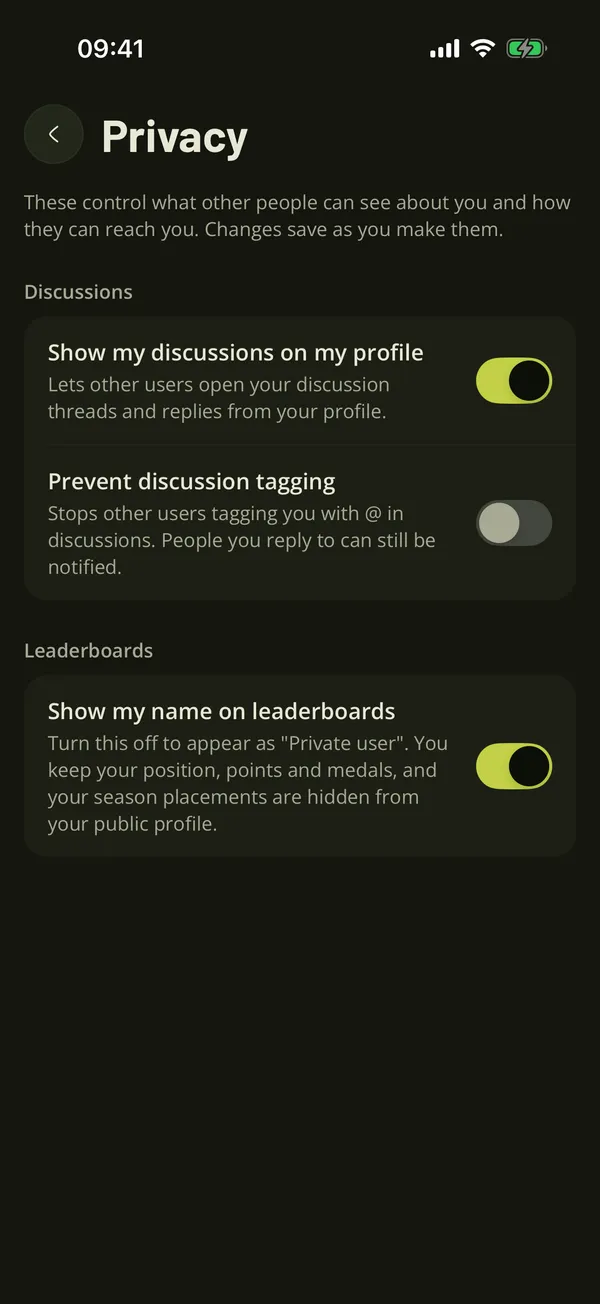
Choose what shows
Decide whether your discussions show on your profile and whether people can tag you.
-
Stay off the board
Hide your name from leaderboards if you prefer.
-
Leave any time
Manage your blocked users, or delete your account from settings.
// YOUR DATA
Privacy, made simple
Changes save as you make them.
Questions about your data? Contact us at [email protected].
- Show or hide your discussions
- Turn off discussion tagging
- Hide from leaderboards
- Delete your account
Frequently asked questions
How do I delete my TradeSoft account?
Go to settings and choose Delete account. You can also contact [email protected].
Can I hide my name on the leaderboard?
Yes. Turn off Show my name on leaderboards in your privacy settings.
Where is my blocked users list?
In your account settings, under Blocked users.
More on TradeSoft
// GET THE APP
Join TradeSoft. It's free.
Join TradeSoft on your terms. Free on iPhone and Android, and on the web.

Prefer your browser? Use TradeSoft on the web