
// BUYING
Wishlists. Let the gear find you.
Stop refreshing the market. Tell TradeSoft what you're hunting for and we'll let you know the moment matching airsoft gear is listed anywhere in New Zealand.

How it works
-
Describe what you want
Add keywords, categories, brands, condition and a price range. Narrow it to your region, a town or a distance from home.
-
Choose how to hear about it
Get a push notification, an in-app alert, or a daily 8pm email roundup of new matches. Or all three.
-
Be first to the deal
When a matching listing goes live, you know about it straight away. Tap through and message the seller.
// IN THE APP
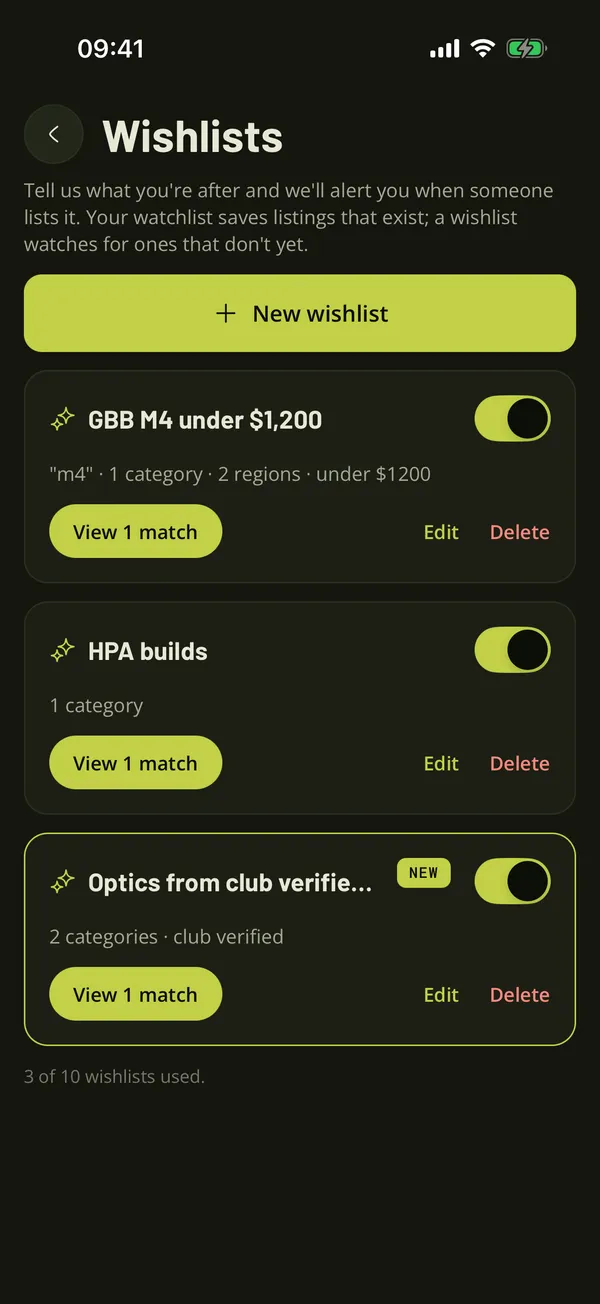
Saved searches that work for you
Each wishlist is a saved search that keeps running in the background. Turn one off when you've found what you need, or keep a few going for the gear you're always keen on.
Want extra confidence? Set a wishlist to only match sellers who are verified members of a New Zealand airsoft club.
- Keywords, categories, brands, condition and price
- Regions, towns or a distance from you
- Club verified sellers only, if you prefer
- Include listings that are already live, not just new ones
- Up to 10 wishlists on the go
Frequently asked questions
How do airsoft wishlists work on TradeSoft?
A wishlist is a saved search. You set what you're after, such as keywords, category, brand, region and price, and TradeSoft alerts you when a new listing matches.
How will I be notified about a match?
You can get a push notification on the iPhone or Android app, an alert in your TradeSoft inbox, and a daily 8pm email summary of new matches. Each one can be switched on or off in your notification settings.
How many wishlists can I have?
You can have up to 10 wishlists at once, and pause or delete them any time.
More on TradeSoft
// GET THE APP
Join TradeSoft. It's free.
Set up your first wishlist in under a minute. Free on iPhone and Android, and on the web.


Prefer your browser? Use TradeSoft on the web