
Send payment details from a conversation
Save how you want to be paid once, then send it to a buyer inside a conversation. The card they receive shows when you set those details and whether they have changed since.
Why this exists
Two reasons.
The first is that selling is repetitive. If you shift a few things a month you are typing the same sixteen digits into message after message, and getting them right every time. Save your details once and every buyer gets exactly the same thing, sent in a couple of taps.
The second is the one that took the work. Someone running a scam rarely gives out one set of details. Often the account is not even theirs: the money gets directed into an account borrowed from someone else, or one belonging to a person they have already defrauded, and it changes from sale to sale as those accounts stop being usable. A genuine seller has one account and rarely touches it. Inside a message the two look identical: an account number is an account number.
Sent details now arrive as a card showing when the seller first set them, when they last changed them, and how many times they have changed. Someone who has had the same account on file for a year reads very differently to someone who has changed theirs three times this week. If they change them after they have already been sent to you, the card tells you that too, with the date and the time.
None of that is proof on its own, and there is more on what it is not further down. It is simply something you can see before you pay, and something reasonable to ask about when it looks odd.
Where you can get it
This is for everyone buying and selling on the marketplace. Sellers get the most out of it and buyers see the result.
- On the web app your details
live under
Dashboard > Payment Details, - In the mobile app they are under
Account > Payment details, - and on business accounts you will find the same thing at
Business > Account details > Payment instructions.
The card itself arrives on mobile in the 1.3.2 update. Until you have it, payment details sent to you show as ordinary text rather than as a card, so it is worth updating when the App Store or the Play Store offers it to you.
Nothing here is required of anyone. Saving your payment details is optional, and typing them into a message still works exactly as it always has.
Payment details you save once
You can now save how you want to be paid, then send it to a buyer from inside a conversation. Choose Bank transfer and fill in the Account name and Account number, or choose Other instructions and write your own arrangement in plain text. Business accounts can add a GST number as well, and it goes with the details when you send them.
Your details are never shown on your profile or on your listings. A buyer only ever sees them when you choose to send them.
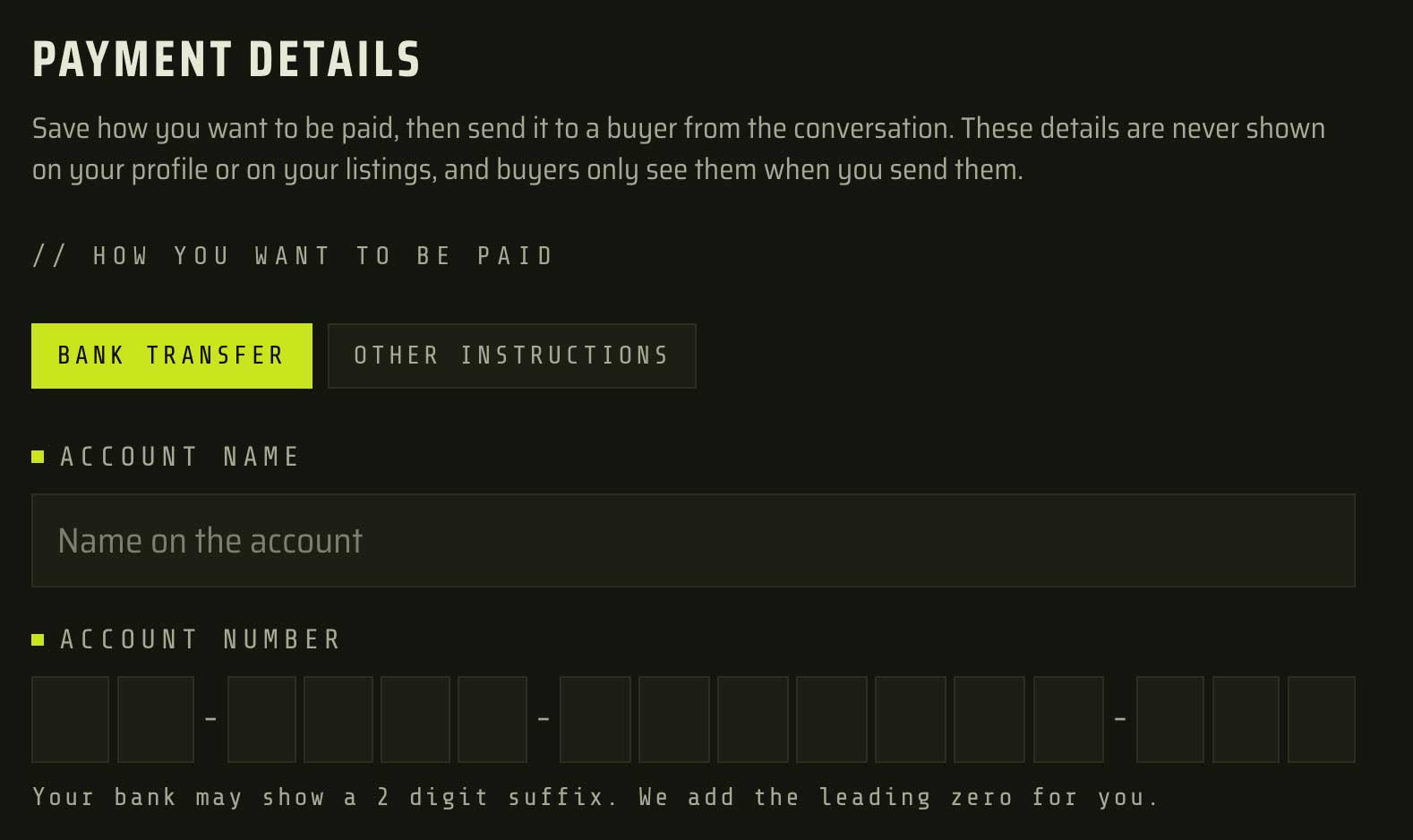
Dashboard > Payment Details.
Before anything is saved you get a Check these details step, which reads your account number back to you in full. Confirm it, or Edit and go back.
The read back step is there because a mistyped account number is the one mistake in all of this that cannot be undone afterwards. Everything else you can go back and fix. A payment that lands in the wrong account is not something anyone can pull back for you.
Sending them from a conversation
In a conversation, the shield button beside the message box is where you send your payment details or your verified phone number. Pick what you want to send and it goes as a card.

Only the seller, meaning the person who listed the item, can send payment details, and only in a conversation you have replied in yourself. Someone you have never answered cannot be sent your account number this way.
The card shows when the details were set
Sent details arrive as a card rather than as ordinary text. It shows the bank, the account name, the account number, and anything you put in Extra instructions.
Underneath, the buyer sees when you first set your details, when you last changed them, and how many times they have changed. If you changed them after that conversation began, the card says so, with the date and the time.
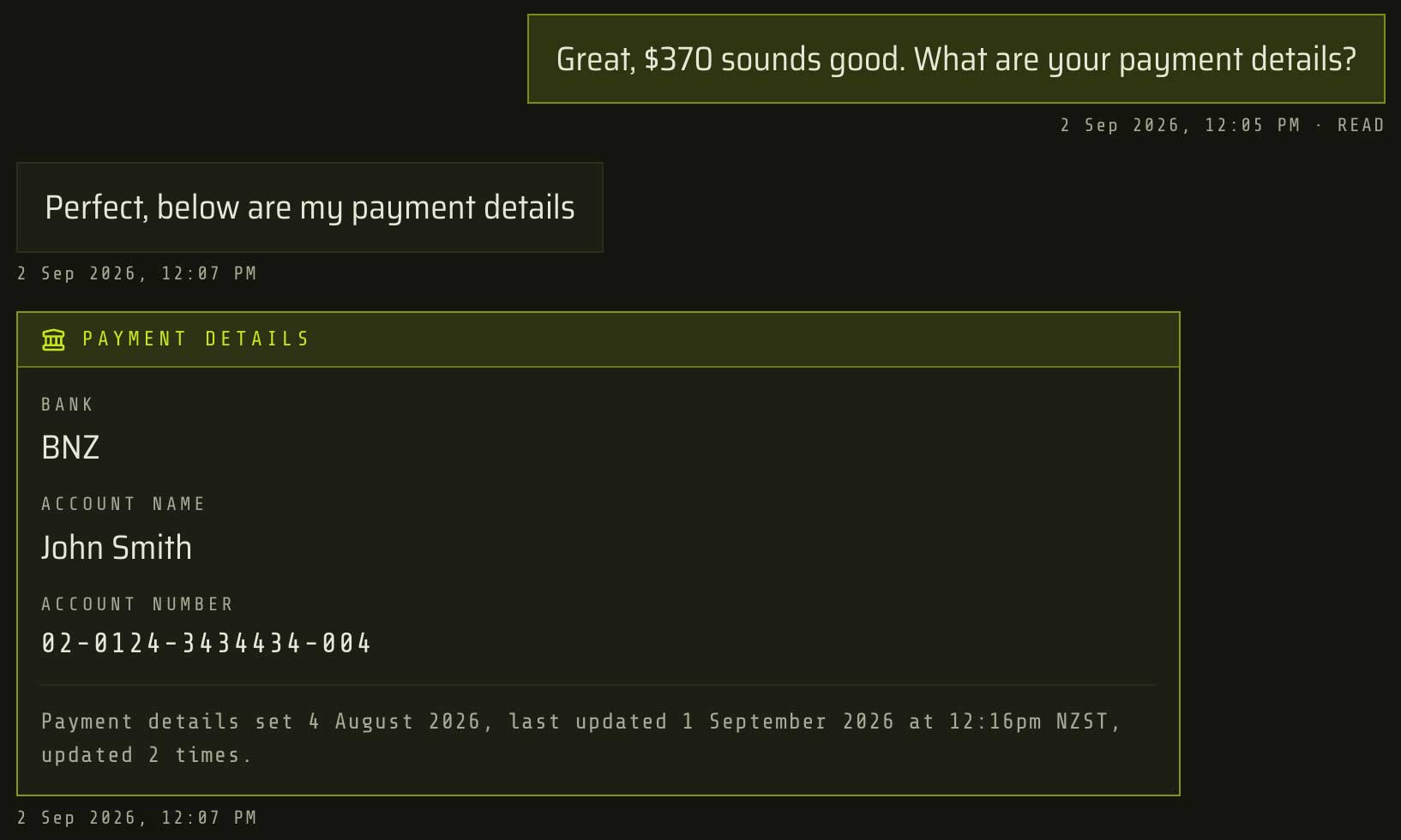
If you have had the same details on file for a year, the card says so, and that is worth something to someone deciding whether to pay you.
To be clear about what it is not: TradeSoft does not check that a bank account belongs to the person sending it. The card shows what is saved on their profile and when it changed. That is genuinely useful to know, and it is not proof of who anyone is.
A reference can change for every sale
Extra instructions is where a payment reference or a pickup arrangement goes. Change it every time you send if you want to. It does not count as a change to your payment details.
Send your verified phone number
If your phone number is verified, you can send that in a conversation as a card too. It shows the number, that it is verified, and how long ago it was verified. On mobile, tap the number to call it.
Either person in a conversation can send a verified number. Sending payment details is the seller only.
The age is the useful part. A number verified this morning and a number verified last year are different claims, and the person reading the card can now see which one they are looking at.
Verifying a number in the first place is done in the mobile app, and verifying your phone number walks through it.
When details are typed into a message
You can still type an account number straight into a message. Where TradeSoft picks that up, the person receiving it sees a short note under the message saying the details were typed rather than sent through Payment details, and that they can ask for them the other way. If you have not saved payment details yet, you will see a prompt to set them up.

If what was typed does not match the payment details saved on that person's profile, the note says that as well.

Typed text carries no history at all. The note gives a buyer a reasonable thing to ask for: the same details, sent a way that shows when they were set and whether they have changed.
Worth knowing
- Only the seller can send payment details, meaning the person who listed the item. Either party can send a verified number.
- You have to have sent a message in that conversation yourself first. An automatic reply from a business account does not count.
- Five sends of payment details per conversation, and five verified number sends per conversation. Both are fixed limits, not values you set.
- New Zealand bank accounts only, and the bank code has to be one TradeSoft recognises. If your bank shows a two digit suffix, the leading zero is added for you.
- Editing your details while sending saves them to your profile. There is no send once version, so the same details always go to everyone.
- The first time you set your details is not counted as a change. Changing the account number, the account name or the method counts. Extra instructions and the GST number do not.
- Notifications never contain the details. A push or an email says only that payment details or a phone number was sent. Details typed into an ordinary message still appear in notifications the way they always have, and our Privacy Policy covers what we do with messages.
- There are still no payments inside TradeSoft. Paying is between you and the other trader, at your own risk, and TradeSoft does not check that a bank account belongs to the person sending it.
- Older mobile app versions show the details as plain text rather than as a card. Update the app.
- Closing your account removes your saved payment details.

