
// SELLING
Seller dashboard. Sell from wherever suits you.
Some people list from the couch, some prefer a keyboard. TradeSoft works both ways, with the same account and listings everywhere.

How it works
-
Use the app or the web
Download the iPhone or Android app, or log in at nz.tradesoft.app.
-
See everything in one place
Active, draft, sold and expired listings, sorted into tabs.
-
Act fast
Edit, bump, feature or mark sold right from the list.
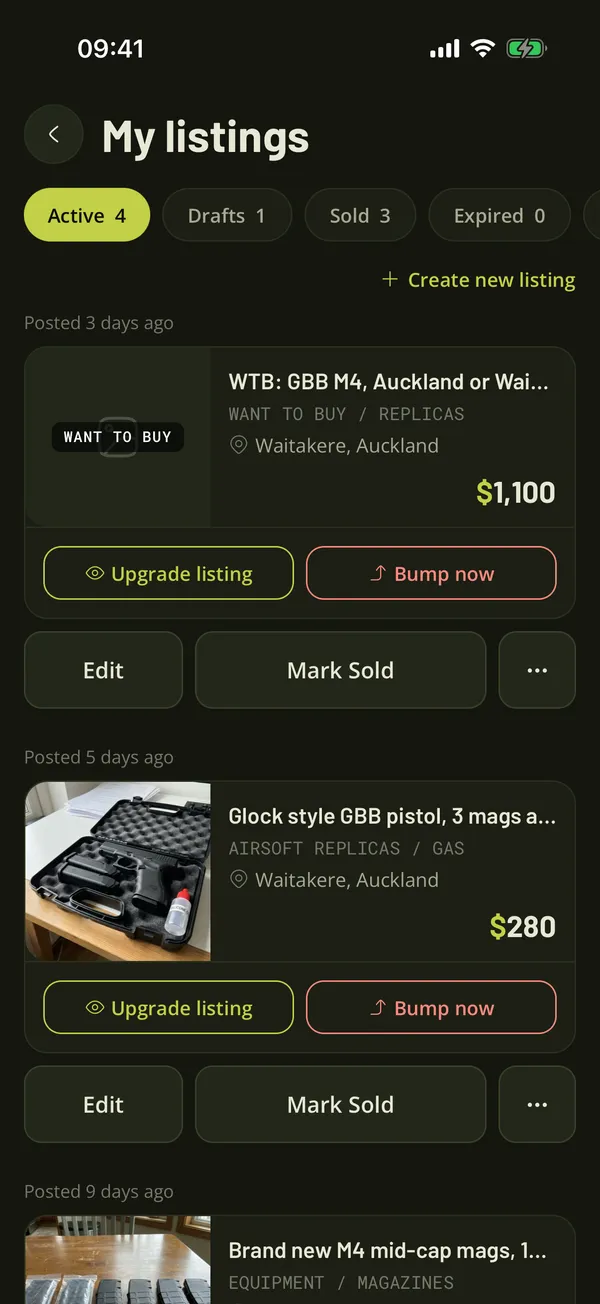
// MY LISTINGS
Your listings, under control
Start a listing on your phone and finish it on your PC, or the other way round.
Messages, feedback and bump credits are all on the same account too.
- iPhone, Android and web
- Drafts, active, sold and expired
- Edit, bump and mark sold
- Same account everywhere
Frequently asked questions
Can I manage my listings on a computer?
Yes. Log in at nz.tradesoft.app for the full web dashboard.
Do my listings sync between the app and the web?
Yes. It's the same account, so listings, messages and feedback are the same everywhere.
Where are my drafts?
In My listings, under the Drafts tab.
More on TradeSoft
// GET THE APP
Join TradeSoft. It's free.
Sell from your phone or your PC. Free on iPhone and Android, and on the web.


Prefer your browser? Use TradeSoft on the web