
// BUYING
Purchase history. Every purchase, in one place.
TradeSoft keeps a record of the gear you buy, so you can look back at what you bought, who from and when, any time.

How it works
-
The seller marks it sold
When a seller records the sale to you, it lands in your purchase history.
-
See the details
What you bought, who from, the date and the price.
-
Rate the seller
Leave feedback from the same screen once your gear has arrived.
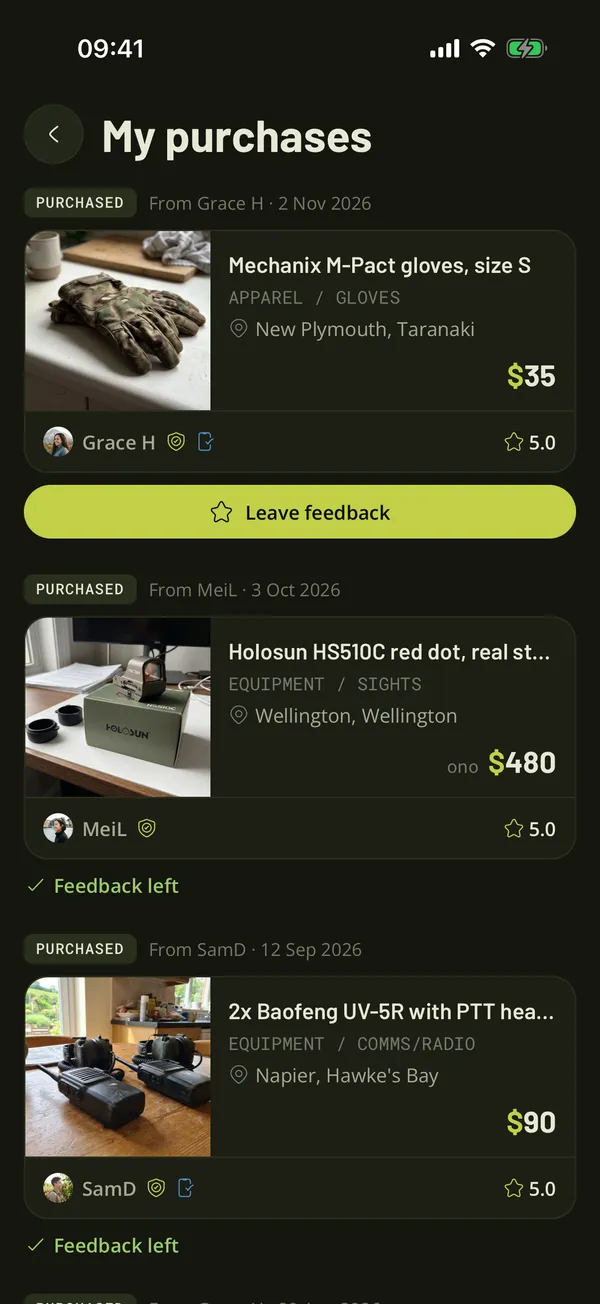
// MY PURCHASES
Your gear, on record
Handy when you want to contact a seller again, check what you paid, or remember where a piece of kit came from.
Each purchase shows whether you've left feedback yet.
- What you bought and when
- Who you bought it from
- What you paid
- Leave feedback from here
Frequently asked questions
Where do I find my purchases?
Open your account in the TradeSoft app or web dashboard and go to My purchases.
Why isn't a purchase showing?
Purchases appear when the seller marks the item as sold to you on TradeSoft. If a seller hasn't recorded it, ask them to mark it sold.
Can I leave feedback from my purchase history?
Yes. Each purchase has a Leave feedback button until you've rated the seller.
More on TradeSoft
// GET THE APP
Join TradeSoft. It's free.
Keep track of your gear. Free on iPhone and Android, and on the web.


Prefer your browser? Use TradeSoft on the web