
// TRUST AND SAFETY
Trust ratings. See their record before you trade.
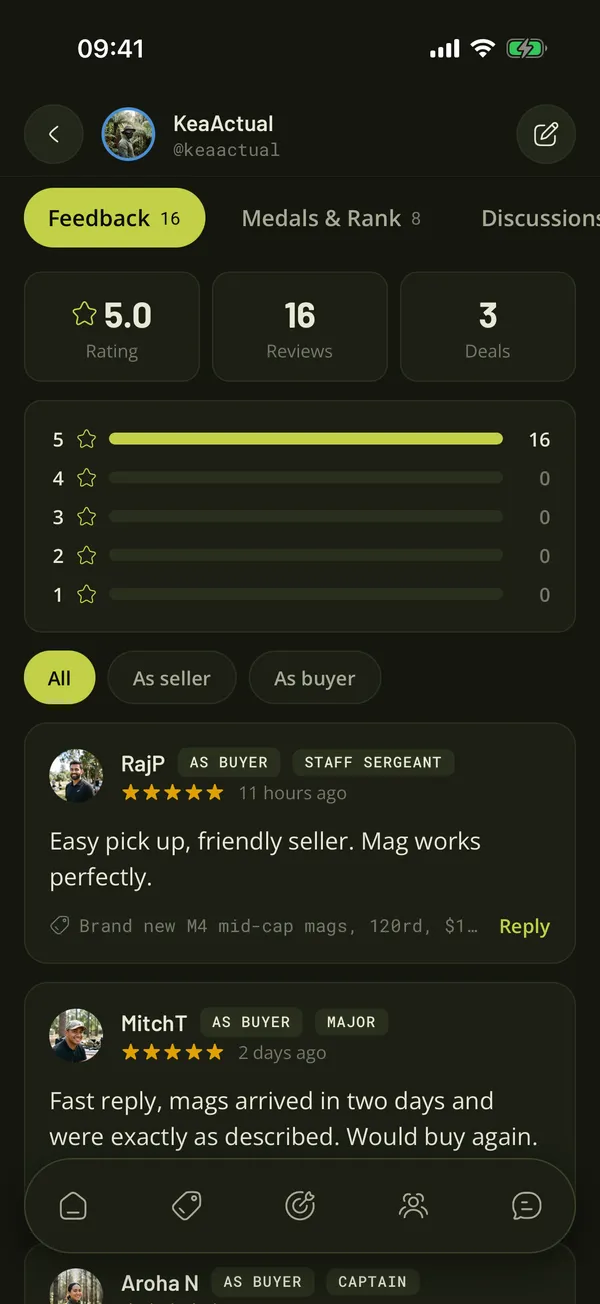
Every TradeSoft profile shows how someone's trades have gone, as a buyer and as a seller, so you can decide who to deal with.

How it works
-
Open their profile
Tap the seller or buyer's name on a listing or in a chat.
-
Check their feedback
See their average rating, the breakdown, and what people wrote.
-
Look for badges
Phone verified and club verified badges add extra confidence.
// ON EVERY PROFILE
A record built trade by trade
Feedback is split into ratings as a seller and as a buyer, so you see the full picture.
Our community averages 5 stars.
- Ratings as a buyer and as a seller
- Written feedback from real trades
- Phone and club verified badges
- Rank and medals for active members
Frequently asked questions
How do I check a seller's feedback?
Tap their name on a listing or in a chat to open their profile, then open the Feedback tab.
Where does feedback come from?
From recorded trades on TradeSoft. Buyers rate sellers and sellers rate buyers.
Can people reply to feedback?
Yes. People can reply to feedback they receive, so you see both sides.
More on TradeSoft
// GET THE APP
Join TradeSoft. It's free.
Trade with people you can check up on. Free on iPhone and Android, and on the web.


Prefer your browser? Use TradeSoft on the web