
// BUYING
Price-drop alerts. Know when it gets cheaper.
Like the look of something but not the price? Watch the listing on TradeSoft and we'll tell you if the seller brings it down.

How it works
-
Tap the heart
Add any listing to your watchlist with one tap, from the market or the listing itself.
-
The seller drops the price
If the seller lowers their asking price, TradeSoft picks it up straight away.
-
You get the alert
A push notification tells you the old and new price, so you can jump in before someone else does.
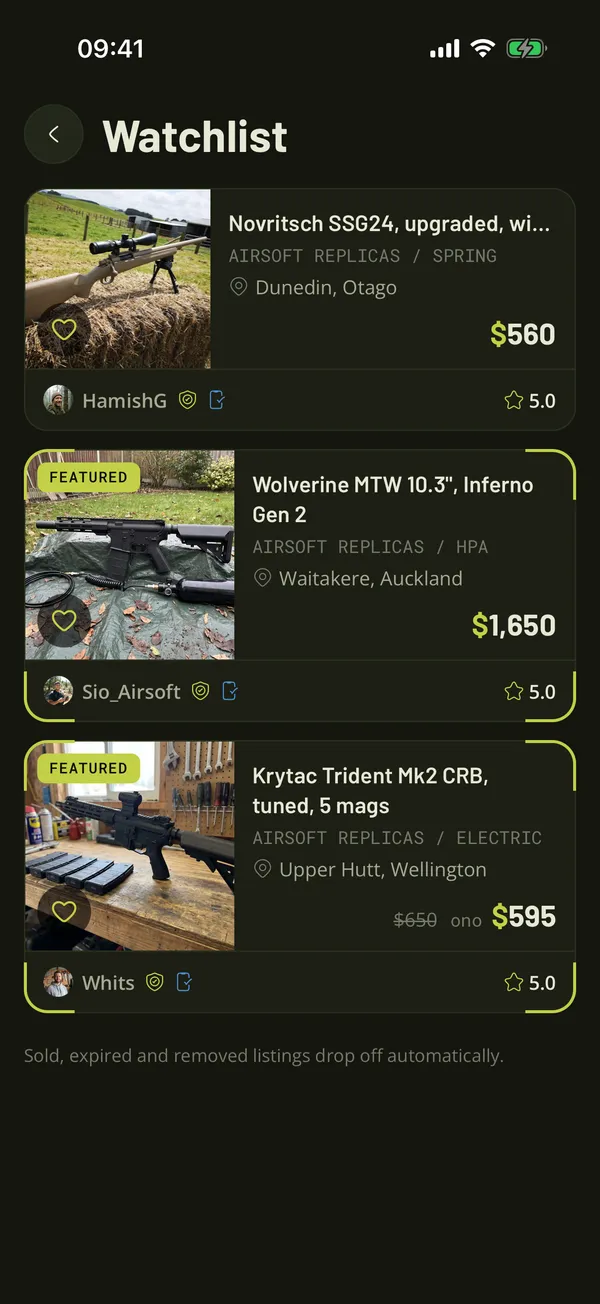
// YOUR WATCHLIST
Everything you're keeping an eye on
Your watchlist keeps all the listings you're interested in together, with reduced prices clearly marked.
Sold, expired and removed listings drop off automatically, so the list stays tidy.
- Watch as many listings as you like
- Instant alert when a price drops
- Old price shown next to the new one
- Price reduced badge across the market
Frequently asked questions
How do I watch a listing?
Tap the heart on any listing. It's added to your watchlist, which you can find in your account.
Will I be told when a watched item drops in price?
Yes. When a seller reduces the price of a listing you're watching, you get a price drop notification showing the new price.
Can I turn price drop alerts off?
Yes. Price drop alerts can be switched off for push and email in your notification settings.
More on TradeSoft
// GET THE APP
Join TradeSoft. It's free.
Start watching the gear you want. Free on iPhone and Android, and on the web.


Prefer your browser? Use TradeSoft on the web