
// BUYING
Listing details. Everything before you message.
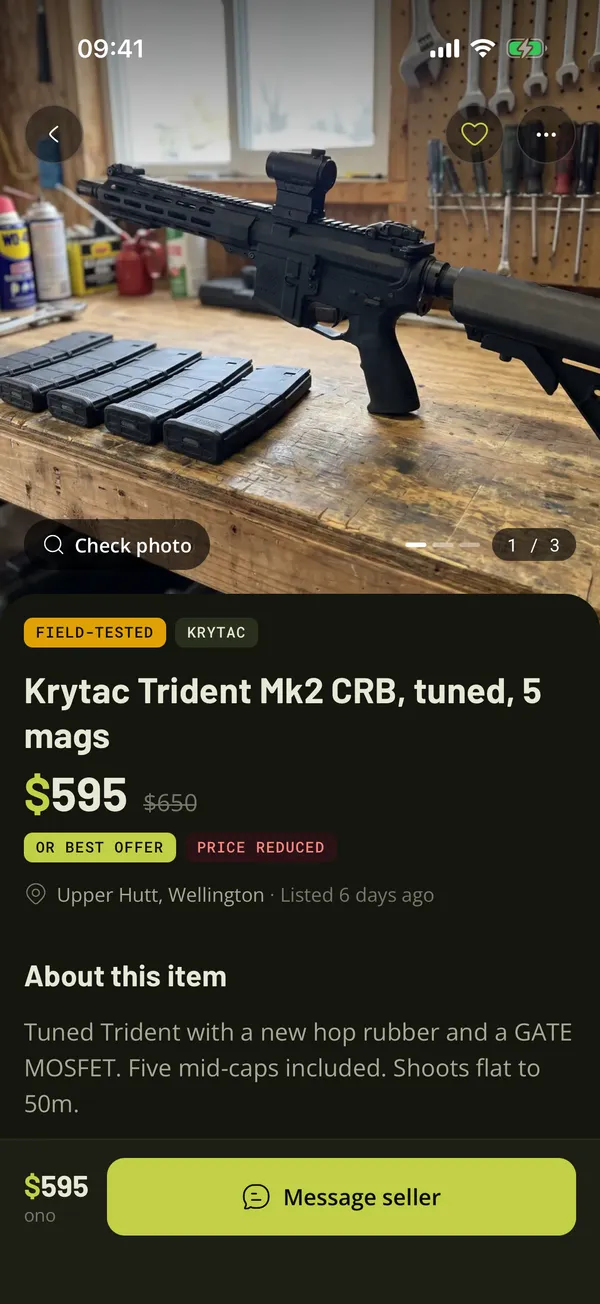
TradeSoft listings put the details buyers actually need right on the page, so you can decide quickly and message with confidence.

How it works
-
See the gear properly
Zoom right into photos, and watch a video if the seller has added one.
-
Check the specs
FPS, joules and material for replicas, plus condition, brand and category.
-
Know the deal
Price, or best offer, shipping cost, and whether the seller is open to trades.
// ON EVERY LISTING
The details that matter
Sellers fill in a guided form, so listings are consistent and easy to compare.
The seller's rating, verified badges and how long they've been on TradeSoft are right there too.
- Up to 7 photos, with zoom
- FPS, joules and material for replicas
- Condition, shipping and trade options
- Seller rating and verified badges
Frequently asked questions
What specs do airsoft listings show?
Replica listings can show FPS, joules and material, along with condition, brand, category, price and shipping options.
Can I see who I'm buying from?
Yes. Every listing shows the seller's rating, their phone and club verified badges, and links to their full profile.
Can I make an offer?
If a listing is marked or best offer, the seller is open to offers. Message them through the listing.
More on TradeSoft
// GET THE APP
Join TradeSoft. It's free.
Browse NZ airsoft gear with all the details up front. Free on iPhone and Android, and on the web.


Prefer your browser? Use TradeSoft on the web