
Member pricing, extra costs and amenities on events
Events can now carry a second price for members, a list of what else you sell on the day, and the amenities players will find at the field. All optional, all set when you create or edit an event.
Until now an event had one price field: Cost. That covers a flat fee and nothing else, so everything more complicated ended up typed into the description. Member rates, hire kit, ammo prices, whether there are toilets. Three additions give each of those a proper place. All three are optional and all three are off by default.
You set them up in the web app, under Club management > Events for clubs and Business > Events for businesses. What you enter is visible to everyone on the web straight away. In the mobile app the new pricing and amenities appear from the next app release, not today, and older app versions carry on working normally and simply do not show the new fields.
Nobody has to do anything. Events that use none of this look exactly as they did before.
A second price for members
Beside Cost there is now Member cost. Fill it in and both prices show. Leave it blank, which is how every event starts, and nothing changes.
The member price is shown to everyone, including people who are not signed in and are not in your club. That is deliberate. Someone scanning the events feed who sees $35.00 with Members $15.00 underneath has a reason to ask about joining. Hiding the discount from non-members would remove the one thing that makes it persuasive.
It appears everywhere a price appears: the events feed, your club page, the event itself, and the events widget on your own website, where it follows that widget's existing Show prices setting.
Clubs have priced members differently for years and had nowhere to say so except the description, which cannot be read from a list.
Additional costs
Turn on Add additional pricing and you get rows of Item, Cost and Member cost. Hire kit at $40. A kilo of 0.25g BBs at $25, or $20 for members. Green gas at $15. Press Add for another row, up to 20.
Only the item name and the cost are required. Member cost is optional per row, so you can discount some things and not others. On the event page these appear as a table under // ADDITIONAL COSTS. The Non-member and Members headings only appear when at least one row has a member price, so an event with a single price per item stays a plain two-column list.
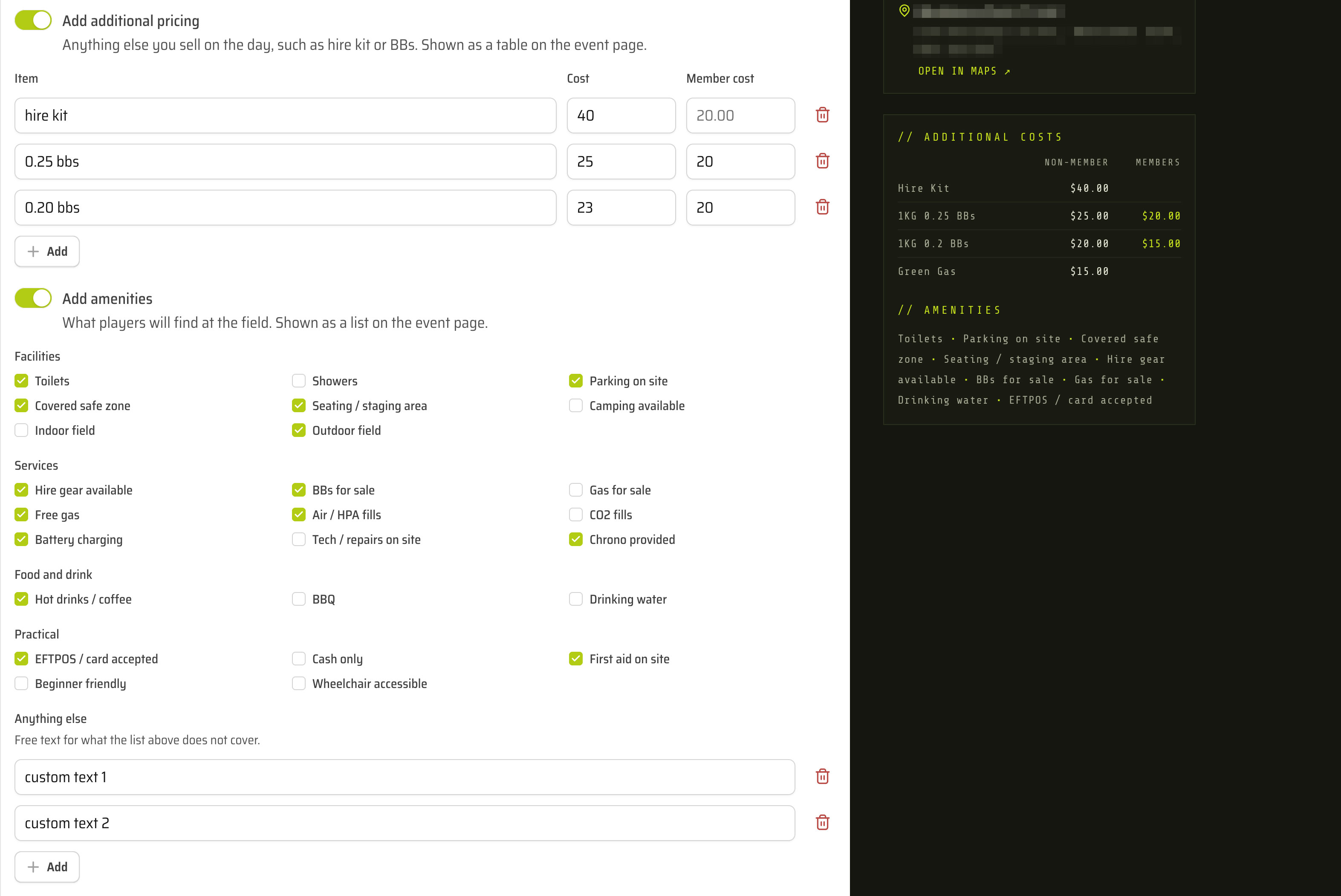
This information already existed on most events. It was just buried mid-paragraph in a description where nobody could scan or compare it, and it had to be retyped for every event.
Amenities
Turn on Add amenities and tick from 25 options, grouped as Facilities, Services, Food and drink and Practical. Toilets, parking on site, covered safe zone, hire gear, air fills, chrono provided, hot drinks, EFTPOS, first aid, and so on. Anything the list does not cover goes under Anything else as free text.
They show on the event page under // AMENITIES as one bullet-separated line.
The list is fixed rather than free text for a reason: when every club uses the same words for the same thing, those words can be searched later. Nothing searches or filters by amenity today.
Mostly, though, it answers the questions organisers get asked before every game, without anyone having to ask them.
Each date can differ
A recurring event copies its pricing and amenities to every date, and any single date can then differ from the rest. If there is no hire kit one Sunday, edit that date on its own and the rest of the series keeps its own details.
This follows the rule already in place for editing one date: once you have edited a date individually, later changes made across the series leave that date alone, so your one-off change is not quietly overwritten. What changes is usually one date, not the whole series.
These changes do not notify anyone
Changing an event's Cost still notifies everyone who has RSVP'd and marks the event Updated since posted. Changing Member cost, additional costs or amenities does neither.
These are the fields you will adjust most often. A notification every time a BB price moves 50 cents teaches people to ignore the notifications that matter, so these save quietly instead.
Worth knowing
- 20 additional pricing rows per event. A fixed maximum, not something you set.
- 20 free text amenities, up to 40 characters each. Item names are limited to 60 characters.
- 25 preset amenities. Clubs cannot add their own to the list, which is what Anything else is for.
- Costs must be numbers. No "from $15" or "$25/$30". Use a separate row for each price.
- Ticking Free event clears both prices. A free event has no member price, because there is nothing to be cheaper than.
- A row left blank is dropped when you save. A half-filled row is not an error you have to hunt down, but a row with a name and no cost will be refused.
- Additional costs and amenities appear on the event page only. Not in event lists, and not in the website widget. The widget is a compact list of dates and prices, and a pricing table would not fit it.
- Website widget changes take up to 15 minutes to appear. Same as any other event edit.
- Nothing is enforced or verified. Member pricing is information shown on the page. TradeSoft does not check anyone's membership and does not take payment. What you agree at the gate is between you and the player.
- In the mobile app, all of this arrives with the next release.
Where to find it
Open the web app, go to your club dashboard or business dashboard, and pick Events. Both toggles sit with the rest of the event details, under Cost.

