
Discussions: a community board on TradeSoft
Discussions is a board where you can start a thread, reply and vote on what other players post. It sits under Community in the web app, alongside Clubs, Events and Feature Requests.
There is nothing to set up. Discussions is on for everyone with an active account, and if you never post, nothing else about TradeSoft changes for you. Two optional privacy settings are covered further down for people who want to change how their activity shows up.
A board for talking to each other
Anyone signed in can start a thread, reply to one, and vote posts up or down. Threads are filed under one of five categories: General Chat, New to Airsoft, Tech & Upgrades, Gear & Loadouts and Gameplay & Tactics.
Filter the board to one category with the chips at the top, or leave it on All. Three sort tabs change the order: New (the default, most recent first), Hot (recent posts with votes behind them) and Top (highest score). Search runs across thread titles and bodies, and works alongside whichever category and sort you have selected. The board loads more threads as you scroll.
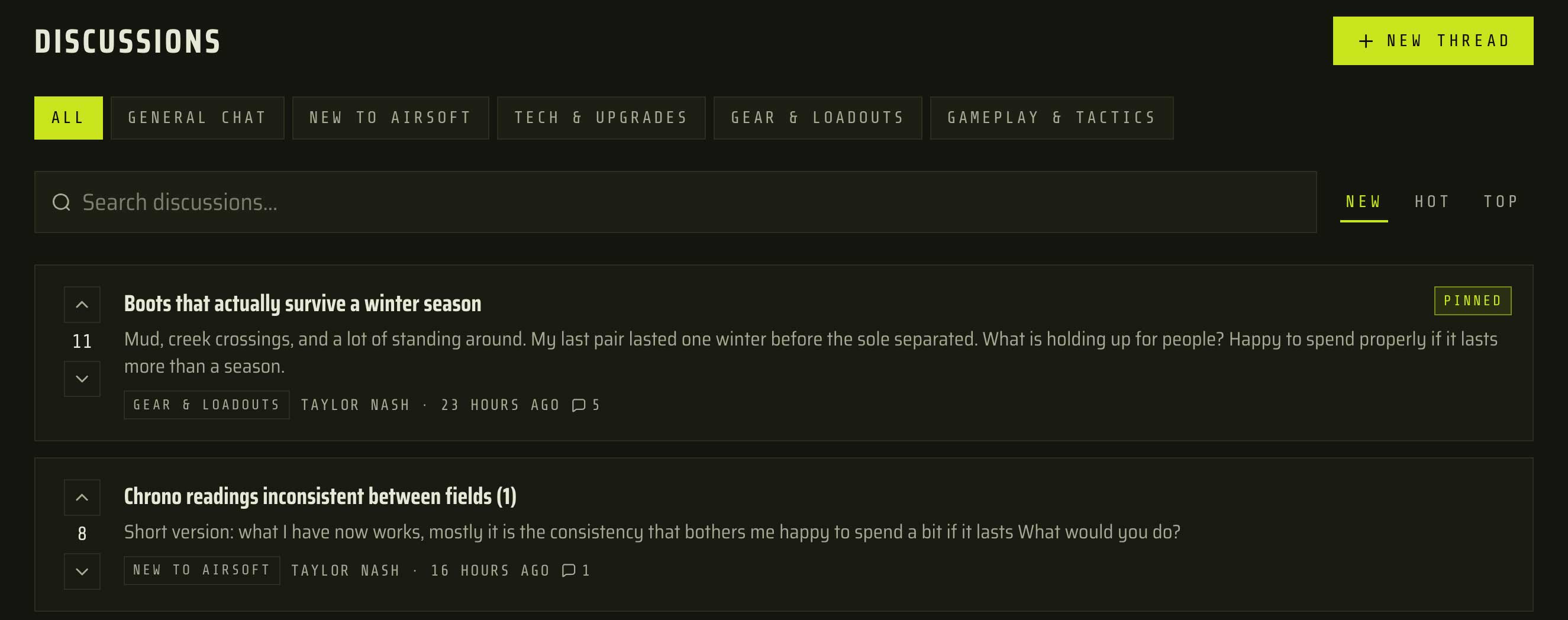
TradeSoft already has places to talk, but each one is narrow. Messages are private and tied to a listing. Event questions are attached to one game day. Feature Requests is for telling us what to change about TradeSoft itself. None of those cover a player asking the wider community which boots survive a winter season, or why two fields chrono the same gun differently. That conversation was happening off the platform. Discussions gives it somewhere to live next to the gear and the game days it is about.
Threads, replies and formatting
A thread has a title (3 to 160 characters) and a body of up to 10,000 characters. Replies can be up to 5,000 characters.
The composer has a small toolbar: Heading, Bold, Italic, Bullet list and Numbered list. Plain web addresses become links automatically. Photos cannot be posted in a thread or a reply.
Replies nest three levels deep. Reply to a comment at the third level and your reply lands beside it rather than deeper, so a long back and forth stays readable instead of sliding off the side of the screen. Any comment and everything under it can be collapsed with one click. Replies sort by Top by default, or by New.
You can edit your own thread or reply for five minutes after posting. After that the Edit option disappears and edited posts are labelled. Five minutes covers what editing is for, fixing a typo or a link you got wrong, without letting someone rewrite a post after ten people have replied to it and argued with what it used to say.
Mentions
Type @ in any composer and a list of users appears as you type.
Mentions are bound to the person, not to the text, so if they later change their display name the mention keeps pointing at them and shows the new name. Typing a name by hand without picking it from the list is just text, and notifies nobody.
It is the difference between "the tech who fixed my gearbox" and actually reaching them. Binding it to the person also means nobody gets pulled into a thread because their name happens to match someone else's.
Notifications
You get a notification when someone replies to your thread, replies to your comment, or mentions you. These appear in Notifications in the web app and link straight to the exact comment, not just the thread. Discussions does not send email: a busy thread would fill your inbox, so for launch it is in-app only.
Your profile, and two privacy settings
Your recent threads and replies appear as a Discussions section on your public profile, showing the ten most recent with their score.
Under Dashboard > Settings > Privacy there are two toggles:
- Show my discussions on my profile. Turn it off and that section stops appearing for other people. You still see it on your own profile.
- Prevent discussion tagging. Turn it on and you stop appearing in the @ list, so nobody can tag you. People you reply to can still be notified, because that is a reply to them rather than a tag.
Posting on a board and having a running list of everything you have said pinned to your profile are two different things, and buyers and sellers should get to decide the second one separately.
Deleting, reporting and moderation
You can delete your own thread or reply at any time, and both carry a Report option that uses the same report flow as listings and profiles. Reports are reviewed by TradeSoft.
TradeSoft can lock a thread, which leaves it readable but closes it to new replies, and can remove a thread or comment that breaks the rules. A removed post shows as Removed by a moderator.
Deleting is one way and cannot be undone, and it only removes your own post. Delete a thread and the replies stay readable: the thread stays listed on the board showing only its title, with your name and the post itself gone. Delete a reply and a Deleted by author placeholder stays in the thread with your name on it, so the replies underneath still make sense. A conversation other people contributed to is not erased because the person who started it changed their mind.
Limits worth knowing
- You have to be signed in to read the board. Discussions is not visible to the public web or to search engines. Share a link to a thread and the person opening it is asked to sign in first.
- Sizes are fixed. Thread title 3 to 160 characters, thread body 10,000, reply 5,000, replies nested three levels deep.
- Posting limits. 6 new threads per hour, 30 replies per hour, and 15 seconds between replies. If you hit one, the message tells you how long to wait. Normal use will not reach them.
- Ten entries on your profile. The Discussions section shows your 10 most recent, and that number is not adjustable.
- No images. Text, links and formatting only.
- Suspended accounts cannot post, reply or vote.
- Blocking works here too. If you have blocked someone, their threads and comments do not appear for you, and neither of you can tag the other.
Where it fits
Feature Requests is still the place to tell us what to change about TradeSoft, and it is the board we read as product feedback. Discussions is for airsoft: the gear, the fields, the games and everyone playing them. Both sit under Community, next to Clubs and Events.
Open the web app, head to Community > Discussions and start a thread.

