
// TRUST AND SAFETY
ScamScan. Stolen photos get caught.
Reused photos lifted from overseas shops and old listings are a classic warning sign. TradeSoft checks for them automatically, and gives you the tools to check for yourself.

How it works
-
Photos are checked automatically
Listing photos are reverse checked using Google's image tools, and images sent in messages are checked too.
-
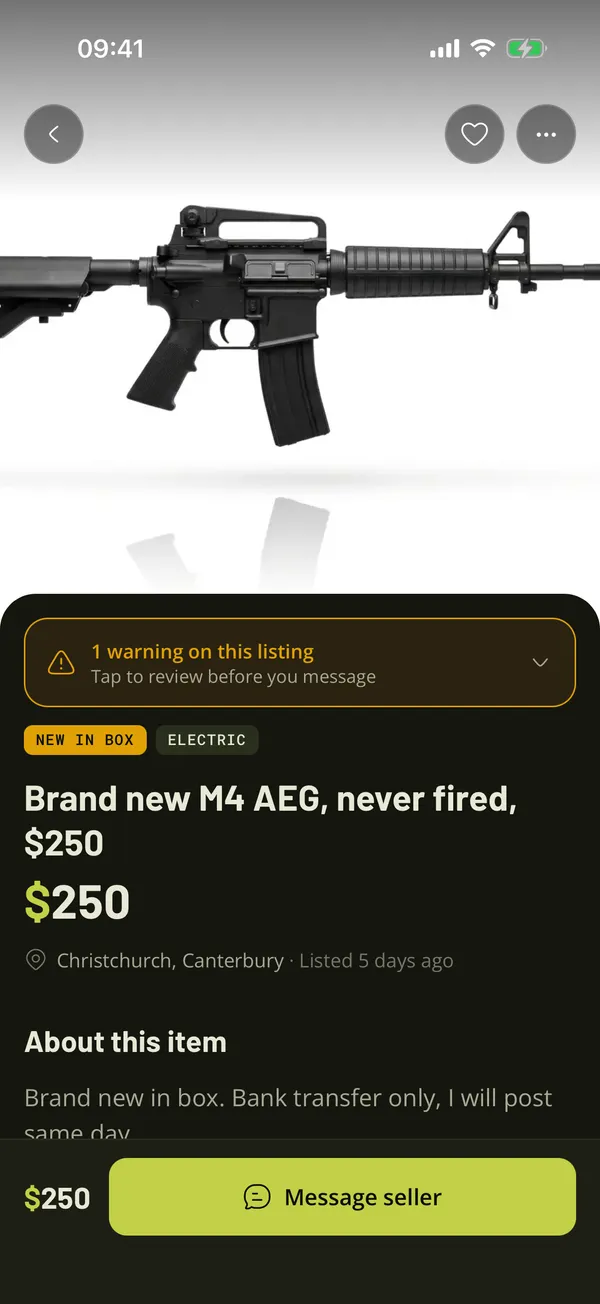
Suspect photos are flagged
If a photo has been seen elsewhere online, buyers see a warning on the listing before they message.
-
Check it yourself
Run any listing photo through Google Lens, Yandex, TinEye or Bing, right from the app.
// SAFER TRADING
A second look at every photo
ScamScan is one part of how TradeSoft helps keep the marketplace safe. Behind the scenes, our systems also watch for patterns common in scams.
The app is also region locked to New Zealand and Australia.
- Automatic photo checks
- Warnings shown on flagged listings
- Reverse image search built in
- Images in messages checked too
Frequently asked questions
What is ScamScan?
ScamScan reverse checks listing photos against the web. If a photo appears elsewhere online, the listing shows a warning so buyers can look more closely.
Does a ScamScan flag mean the listing is a scam?
No. A flag means the photo was seen on other sites. There can be good reasons, such as a manufacturer photo. Ask the seller for their own photos and do your own checks.
Can I check a photo myself?
Yes. From any listing photo you can run a reverse image search with Google Lens, Yandex, TinEye or Bing.
More on TradeSoft
// GET THE APP
Join TradeSoft. It's free.
Trade on a marketplace that takes safety seriously. Free on iPhone and Android, and on the web.


Prefer your browser? Use TradeSoft on the web